Command line
Decks to text and Markdown from the terminal.
One binary. pptxboss reads, verifies and creates PowerPoint decks, takes a .pptx or a legacy .ppt for anything it reads, picks slides with --slides, and prints what it had to skip as warning: lines on stderr instead of failing silently. Installed from crates.io, MIT OR Apache-2.0.
check uses 1 for findings at error severity.Read
Text, notes, comments and structure.
Text comes out in z-order, one paragraph per line, table rows tab-separated. Chart data and diagram text are included unless --no-charts or --no-diagrams is given. --slides takes one-based numbers and ranges such as 1-3,7, printed in the written order.
$ pptxboss info deck.pptx                  # format, slide count, size, properties, sections, one line per slide
$ pptxboss text deck.pptx                  # slide text, slides separated by a blank line
$ pptxboss text --notes --headings deck.pptx
$ pptxboss text --comments --alt-text deck.pptx   # comments after each slide; alt text of pictures
$ pptxboss text --slides 2-4,7 --json deck.pptx   # only those slides, in that order
$ pptxboss text --threads 1 deck.pptx      # cap the worker threads (default: every core)
$ pptxboss text legacy.ppt                 # PowerPoint 97-2003, same output
Subcommands
Everything the binary does.
| info | Format, slide count, slide size, master and part counts, core properties, sections and one line per slide with its flags |
|---|---|
| text | Slide text; --notes, --comments, --alt-text, --furniture, --hidden-shapes, --skip-hidden, --no-charts, --no-diagrams, --headings, --json |
| markdown | The deck as Markdown: a heading per slide, bullets, GFM tables, images, chart tables, diagram outlines; --notes and --comments as block quotes |
| check | Verify against 72 ECMA-376 rules; --json, --quiet, --max-findings N, --no-crc |
| rules | Every rule with its severity, code, clause and summary |
| create blank | A new deck of empty slides |
| create text | A new deck from a title, bullets and notes |
| create md | A new deck from a Markdown file or standard input |
| skill | Install or print the bundled agent skill |
--threads N works before or after any subcommand; PPTXBOSS_THREADS sets the default. Full flags per subcommand in the CLI reference.
Markdown
The deck as a Markdown document.
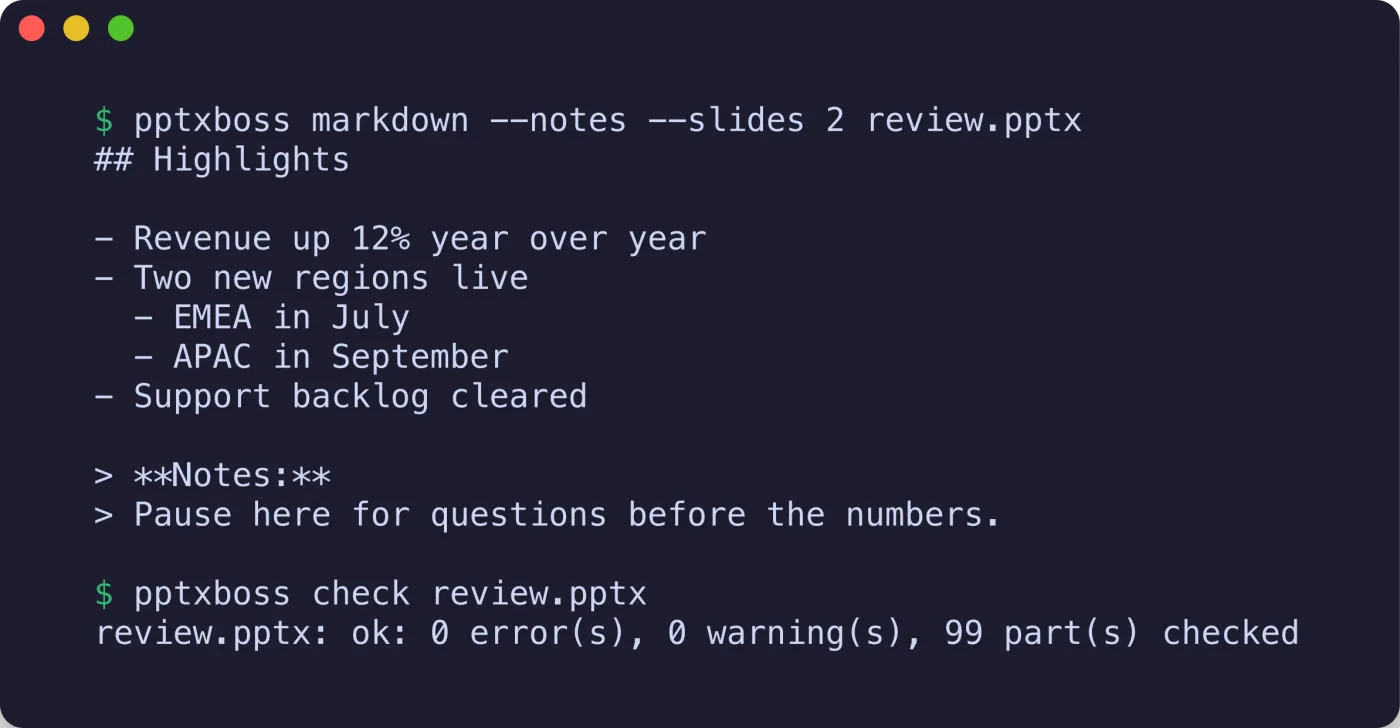
$ pptxboss markdown deck.pptx > deck.md
$ pptxboss markdown --notes --comments deck.pptx   # notes and comments as block quotes
$ pptxboss markdown --slides 1-3 --no-images deck.pptx
Verify
72 rules with their clauses, in CI.
Findings are sorted most severe first and followed by a summary line such as deck.pptx: ok: 0 error(s), 0 warning(s), 41 part(s) checked. Every finding carries a stable code, a severity and the clause it enforces.
$ pptxboss check deck.pptx                 # findings most severe first, then a summary line; exit 1 on errors
$ pptxboss check --json --quiet deck.pptx
$ pptxboss check --max-findings 20 --no-crc deck.pptx
$ pptxboss rules                           # every rule: severity, code, clause, summary
Create
New decks from text or Markdown.
Output is deterministic and passes check with no findings. --standard picks the 4:3 slide size; --font sets the typeface for a Markdown deck.
$ pptxboss create blank out.pptx --slides 3
$ pptxboss create text out.pptx --title "Hello" --bullet one --bullet two --notes "say hi"
$ pptxboss create md out.pptx slides.md    # '#' title slide, '##' content slides, list items, Notes:
$ pptxboss create md out.pptx slides.md --theme tokyo --font Inter   # twelve presets, see /examples
$ cat slides.md | pptxboss create md out.pptx -